

A crypto wallet doesn’t hold your coins. Your coins always stay on the blockchain. What a wallet holds is the private key: the secret that lets you move those coins. That’s why the two questions that matter for any crypto wallet are simple:
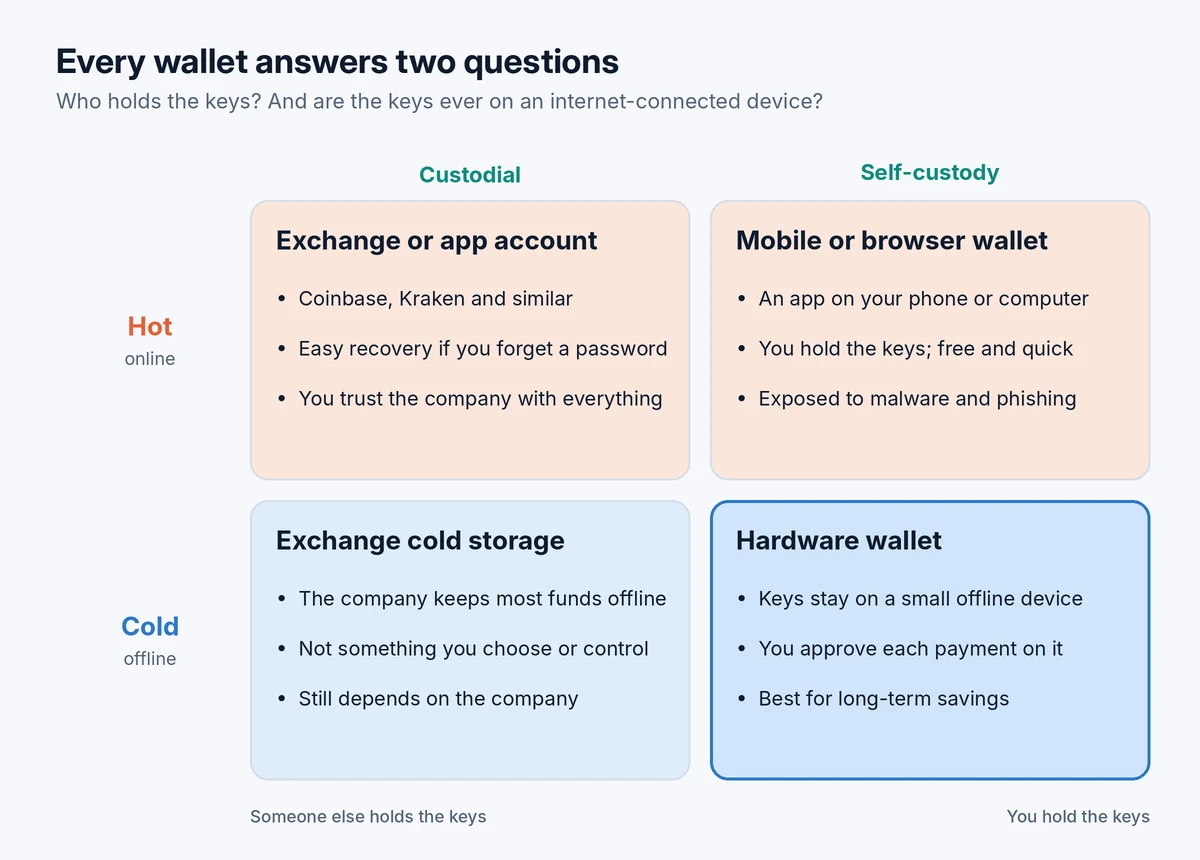
- Who holds the key? If a company holds it for you, the wallet is custodial. If you hold it, it’s self-custody.
- Is the key ever on an internet-connected device? If yes, it’s a hot wallet. If the key stays offline, it’s a cold wallet.
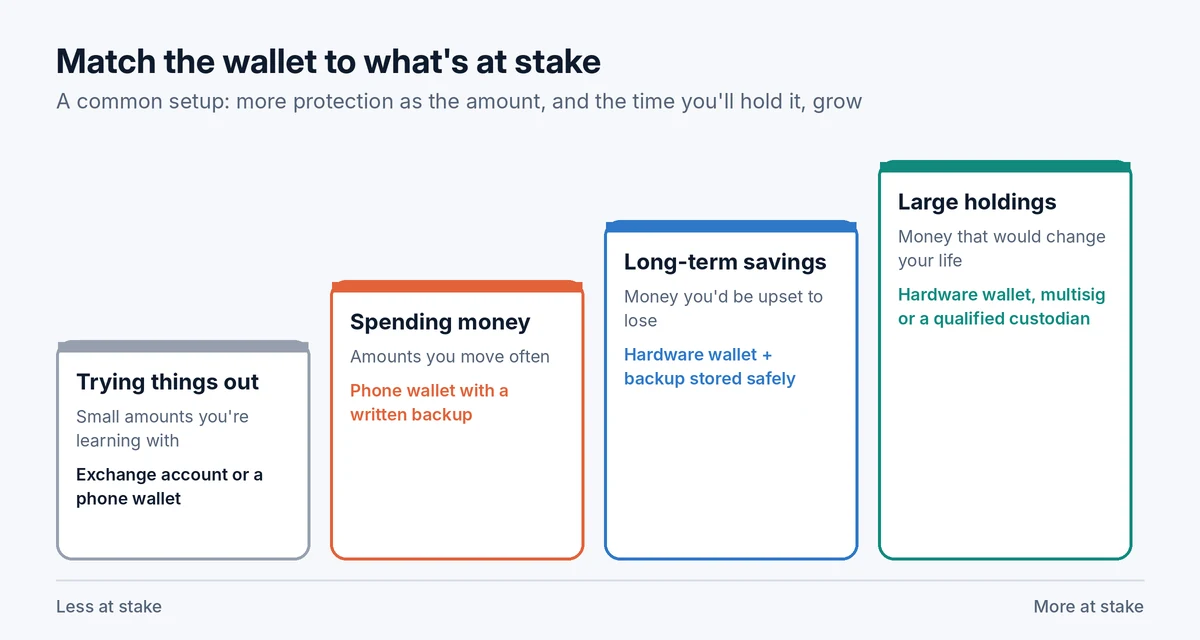
For most beginners, a sensible setup is to keep small amounts in a custodial exchange account or a phone wallet while learning, then move savings they plan to hold for years into a hardware wallet they control. The rest of this guide explains each option in plain terms, what can go wrong with each and how to set up a wallet without making the mistakes that cost people their coins.
What a crypto wallet actually does
Every wallet manages a pair of keys:
- A public address, which works like an account number. You share it so people can send you crypto.
- A private key, which signs transactions and proves the coins are yours. Anyone who has it can take your coins, and nobody can reverse that.
Self-custody wallets also give you a recovery phrase (or seed phrase), usually 12 or 24 words. It’s a human-readable backup of your keys. If your phone breaks or your device is lost, those words restore everything in any compatible wallet. That makes the recovery phrase the single most important thing to protect. Our guide to storing a seed phrase safely covers how.
Ethereum’s official site puts the core idea well: a wallet is just an app that gives you access to your account, so you can switch wallet apps without losing your funds, as long as you have your keys or recovery phrase. You can read more in ethereum.org’s guide to wallets.
The four kinds of wallet setup
Putting the two questions together gives four combinations. Three of them are choices you can make; one is something exchanges do behind the scenes.
Custodial wallets: a company holds the keys
When you buy crypto on an exchange like Coinbase or Kraken and leave it there, you’re using a custodial wallet. Your account shows a balance, but the exchange controls the keys.
What’s good about it:
- It’s easy. There’s nothing to set up beyond your account.
- If you forget your password, the company can help you get back in.
- Buying, selling and converting to cash all happen in one place.
What you’re trusting:
- That the company stays solvent and honest. When FTX collapsed in November 2022, customers lost access to their funds overnight.
- That its security holds. In February 2025, attackers stole about $1.5 billion in ether from the exchange Bybit, one of the largest crypto thefts on record. The FBI attributed the attack to North Korean hackers. Bybit said it would cover customers’ losses, but that depended entirely on the company’s ability to do so.
- That it won’t freeze your account. Exchanges can restrict withdrawals for compliance checks, technical problems or legal orders.
Custodial isn’t automatically bad. A large, regulated exchange is a reasonable place for small amounts and for money you’re about to trade. The risk grows with the amount you leave there and how long you leave it. Is it safe to keep crypto on an exchange? goes through what to check.
Self-custody wallets: you hold the keys
With a self-custody wallet, no company stands between you and your coins. Nobody can freeze them, and if the wallet company disappears, you can restore your coins in a different wallet using your recovery phrase.
The flip side is that you’re fully responsible. There’s no password reset and no support line that can recover your coins. Lose the recovery phrase and your device at the same time, and the coins are gone for good. Share the phrase with a scammer, and they can empty the wallet in minutes.
Self-custody comes in hot and cold forms.
Hot wallets: software on an online device
- Mobile wallets are apps on your phone. They’re convenient for everyday use and receiving payments, and modern phones have reasonable built-in security.
- Browser extension wallets run inside your web browser and are the main way people connect to crypto apps. They’re also the most targeted, because a single malicious link or fake site can trick you into signing something harmful.
- Desktop wallets run on your computer. They’re only as safe as that computer: malware on it can put your coins at risk.
Hot wallets are free and fast to set up, but the key lives on a device that’s connected to the internet, so they’re best for amounts you’d be willing to lose.
Cold wallets: keys kept offline
A hardware wallet is a small device that generates and stores your keys offline. When you send crypto, the transaction goes to the device, you check the details on its own screen and approve it there, and only the signed transaction comes back to your computer or phone. The private key never leaves the device. Even if your computer has malware, an attacker can’t take your coins without you physically approving on the device.
Hardware wallets cost money, add a step to every transaction and require you to protect the recovery phrase carefully. For long-term savings, most security-minded holders consider that worth it. If you’re choosing one, see Ledger vs Trezor, and when you’re ready, follow how to move crypto from Coinbase to a hardware wallet.
Two terms you’ll see alongside cold storage:
- Paper wallets (keys printed on paper) were popular years ago but are now generally discouraged. They’re easy to create insecurely and awkward to use safely.
- Metal backups aren’t wallets. They’re plates you stamp or engrave your recovery phrase onto, so it survives fire or flooding.
More advanced options
For larger holdings, some people use multisig wallets, which require two or more keys (say, two out of three) to approve a transaction. That way, losing one key or having one stolen isn’t fatal. Newer smart wallets use passkeys, social recovery or other methods instead of a single recovery phrase. These can reduce single points of failure but add complexity, so they’re worth exploring once you’re comfortable with the basics.
All wallet types compared
| Wallet type | Who holds the key | Online? | Best for | Main risk |
|---|---|---|---|---|
| Exchange account | The exchange | Mostly | Buying, selling, small balances | Company failure, hacks, frozen withdrawals |
| Mobile wallet | You | Yes | Everyday amounts, receiving payments | Lost phone without backup, scams |
| Browser extension | You | Yes | Using crypto apps | Phishing and malicious approvals |
| Desktop wallet | You | Yes | Occasional use on a trusted computer | Malware |
| Hardware wallet | You | No | Long-term savings | Losing the recovery phrase, fake devices |
| Multisig | You (several keys) | Depends on setup | Large holdings | Complexity and setup mistakes |
How to choose the right setup
There’s no single best wallet. The right choice depends on how much is at stake and how often you’ll move it. Many people use more than one: a phone wallet or exchange account for spending money, and a hardware wallet for savings, the same way you might keep a little cash in your pocket and the rest in a bank.
A few questions help narrow it down:
- How much would it hurt to lose this? If the answer is “a lot”, the coins shouldn’t sit only in a hot wallet or on an exchange.
- How often will you move it? Frequent use favors a phone wallet; long-term holding favors a hardware wallet.
- How confident are you managing a recovery phrase? If you’re not yet, keeping small amounts on a reputable exchange while you learn is reasonable.
- Which coins do you hold? Check that the wallet supports every network you use.
For specific recommendations, see the best crypto wallets for beginners.
Setting up a self-custody wallet safely
- Download from the official source only. Type the wallet’s website address yourself or use the official app store listing, and check the developer name. Fake wallet apps and sponsored search results are a common way people get robbed.
- Buy hardware wallets from the manufacturer or an authorized seller. Avoid second-hand devices and marketplace listings, and never use a device that arrives with a recovery phrase already written down.
- Write the recovery phrase on paper or metal, offline. Never type it into a computer, phone note, cloud document, email or photo.
- Check you wrote it correctly. Most wallets ask you to confirm some of the words. Take your time.
- Store the backup somewhere safe and separate from the device, protected from fire, water and curious eyes.
- Send a small test amount first, then practice restoring the wallet if your wallet supports a safe way to do it, before moving anything larger.
- Set a strong PIN and keep the wallet’s software up to date from the official source.
Mistakes that cost people their coins
- Typing the recovery phrase into a website or “support” chat. No legitimate company will ever ask for it. Anyone who does is trying to steal your coins. More patterns like this are in 10 common crypto scams.
- Storing the phrase digitally, where hackers or a cloud breach can reach it.
- Having only one copy of the backup, so a single fire, flood or move loses everything.
- Approving transactions without reading them, especially on unfamiliar sites. Some approvals give a contract permission to move all of a token.
- Sending on the wrong network or to a wrong address. Always match the network on both sides and check the first and last characters of the address. If it’s already happened, see sent crypto to the wrong network or crypto sent to the wrong address.
- Not planning for others. If something happened to you, could your family access your crypto? How to pass crypto to your family explains how to set this up without exposing your keys.
Common questions
Do I need a wallet if I buy crypto on an exchange?
Not to get started: your exchange account already works as a custodial wallet. You’ll want your own wallet if you plan to hold larger amounts long term, use crypto apps or simply not depend on a company.
Can a hardware wallet be hacked?
Attacks on reputable hardware wallets are rare and usually require physical access to the device and technical skill. Far more losses come from people being tricked into revealing their recovery phrase, buying tampered devices or approving malicious transactions.
What happens if my wallet company goes out of business?
With a self-custody wallet, nothing happens to your coins. They’re on the blockchain, and your recovery phrase can restore them in another compatible wallet. With a custodial wallet, you depend on what happens to the company.
What if I lose my hardware wallet or forget its PIN?
Your coins are safe as long as you have your recovery phrase. You can restore them on a new device. See what happens if you lose your hardware wallet and forgot your crypto wallet PIN.
Why does my wallet show a different balance from the exchange?
Usually because of pending transactions, different networks or how prices are calculated. Why your wallet shows a different balance walks through the causes.
If you’re still finding your feet, our plain-English guide to how crypto works covers the basics, and how to buy crypto safely explains the step before choosing a wallet.
This guide is for educational purposes only and isn’t financial or investment advice.
Pingback: How to Store a Seed Phrase Safely (and Mistakes That Get People Robbed)
Pingback: How Do Bitcoin ETFs Work? ETF vs Buying Bitcoin for Beginners
Pingback: 10 Common Crypto Scams and How to Spot Them (2026)
Pingback: What Is Bitcoin and Why Does It Have Value? Explained Simply
Pingback: How to Move Crypto From Coinbase to a Hardware Wallet (Step by Step)
Pingback: Best Crypto Wallets for Beginners (2026): 7 Options Compared
Pingback: Lost Hardware Wallet? What Happens to Your Crypto and What to Do