

In the Ledger vs Trezor choice, you can’t go badly wrong: they’re the two best-known hardware wallet makers, and either one is a sound pick for a beginner. Both keep your private keys offline, make you confirm every transaction on the device itself, and protect you far better than leaving coins on an exchange.
The short version: choose Ledger if you want the widest coin support and a polished phone app, and you’re comfortable trusting a certified but closed security chip. Choose Trezor if you value open-source code that anyone can inspect, simpler backups and a company focused heavily on bitcoin. For a first device on a budget, the Ledger Nano S Plus and the Trezor Safe 3 are the natural starting points.
This comparison is based on each company’s published specifications and public security record. We haven’t run lab tests on the devices, so we focus on the differences that matter for an everyday user.
Ledger vs Trezor: current models and prices
Both companies sell a range, from simple button-operated devices to large touchscreens. Prices below are approximate list prices in US dollars at the time of writing and change with promotions and region, so check the official stores before buying. Ledger’s guide to its devices and Trezor’s Safe 7 announcement list the current specifications.
| Model | Approx. price | Screen | Phone connection | Good for |
|---|---|---|---|---|
| Trezor Safe 3 | $59–79 | Small monochrome, two buttons | USB-C cable only | Cheapest secure entry point |
| Ledger Nano S Plus | $79 | Small monochrome, two buttons | USB-C cable only | Budget Ledger, desktop users |
| Trezor Safe 5 | $129 | Colour touchscreen | USB-C cable only | Easier screen, no Bluetooth |
| Ledger Nano X | $149 | Small monochrome, two buttons | Bluetooth | Using a Ledger from your phone |
| Ledger Nano Gen5 | $179 | E Ink touchscreen | Bluetooth, NFC | Newer everyday Ledger |
| Trezor Safe 7 | About $249 | Colour touchscreen | Bluetooth | Trezor with phone support |
| Ledger Flex / Stax | $249 / $399 | Large E Ink touchscreen | Bluetooth, NFC | Premium screens |
A more expensive model doesn’t make your coins meaningfully safer. The extra money buys bigger screens, touch controls and wireless connections. For a beginner holding a modest amount, an entry model protects your keys just as well.
The biggest difference: how each one earns your trust
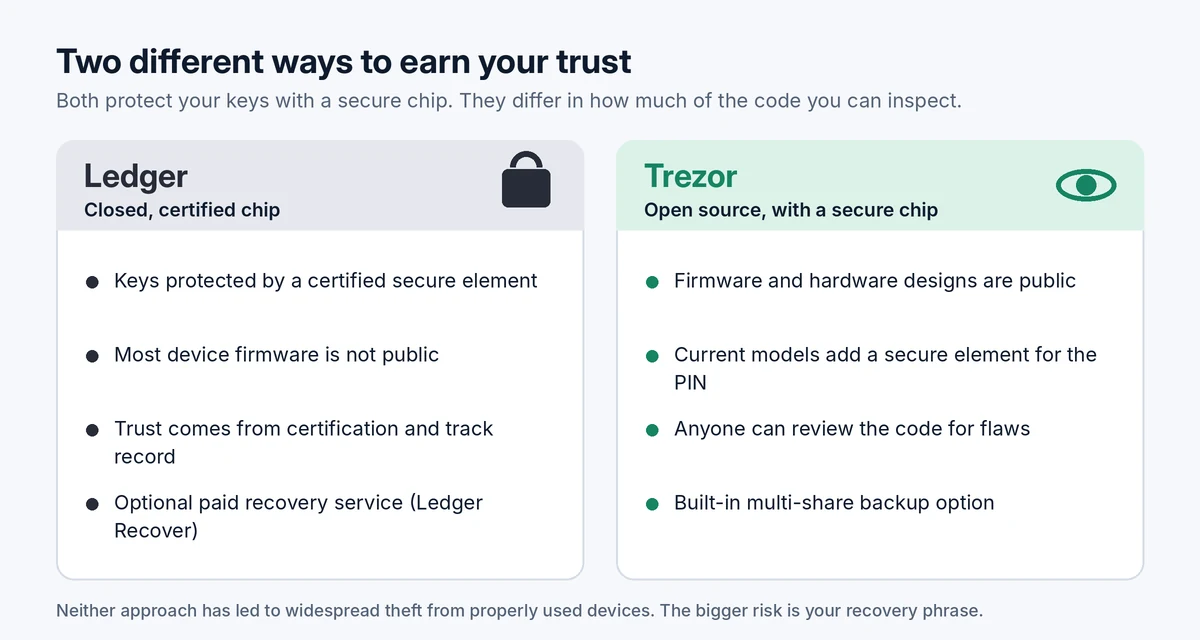
Ledger stores keys inside a secure element, a tamper-resistant chip similar to those in bank cards and passports, with independent security certification. Much of the software running on that chip isn’t public, so you rely on Ledger’s certifications, audits and track record.
Trezor publishes its firmware and hardware designs so that anyone can review them. Its earlier models didn’t use a secure element, which left them open to attacks by someone with physical access to the device and specialist equipment. Current models (Safe 3, Safe 5 and Safe 7) add a secure element to protect your PIN, combining open code with a protective chip.
In practice, both approaches have held up well for people who use their devices properly. Neither company has had its devices broken in a way that let attackers empty wallets remotely. The real risks for most people sit elsewhere, mainly in how they handle their recovery phrase.
Controversies worth knowing about
- Ledger’s 2020 customer data leak. Ledger’s marketing database was breached, exposing customers’ email addresses and, for many, their names and home addresses. No funds were taken from devices, but those customers were targeted for years by phishing emails and even fake letters asking for their recovery phrases. The lesson applies to everyone: no wallet company will ever ask for your recovery phrase.
- Ledger Recover (2023). Ledger launched an optional paid service that backs up encrypted pieces of your recovery phrase with third-party companies, tied to identity verification. It’s entirely opt-in, but it upset some users because it showed that the device’s firmware could export recovery information if the user agreed. If you prefer to avoid that trade-off, simply don’t use the service.
- Trezor’s older models. Researchers have shown that devices without a secure element can be attacked with physical access. Setting an extra passphrase protects against this, and current Trezor models address it with a secure element.
Ease of use for a beginner
Both are straightforward to set up: you connect the device, create a PIN, write down the recovery phrase and confirm it. Each company has a free app for managing your coins: Ledger Wallet (previously called Ledger Live) and Trezor Suite.
- Ledger’s app does more: buying, swapping, staking and connecting to crypto apps, all from one place, with strong mobile support on Bluetooth models.
- Trezor Suite is cleaner and more focused, with good privacy features for bitcoin users. Mobile use is limited to the Safe 7, the only Trezor with Bluetooth, unless you use a cable with an Android phone.
- Screens: the cheapest models of both brands use small screens and two buttons, which work but can be fiddly when checking long addresses. If that bothers you, the Trezor Safe 5 is the cheapest touchscreen option, and the Ledger Nano Gen5 is the cheapest Ledger with one.
Coin support
Both support the major coins (bitcoin, ether, stablecoins and most popular networks). Ledger generally supports a wider range of coins and tokens, including many smaller networks. Trezor covers the main ones well but may not support every niche coin, and it offers bitcoin-only versions of some models for people who want the simplest possible setup. Before buying, check that every coin you own appears on the manufacturer’s supported list.
Backups and recovery
With either device, your recovery phrase is what really matters: if the device is lost, broken or stolen, the phrase restores everything on a new one. Both brands use standard recovery phrases, so you can also restore them in other compatible wallets.
Trezor adds an option called multi-share backup, which splits the recovery into several parts, say three, any two of which can restore the wallet. That way, losing one copy or having one found doesn’t put your coins at risk. Ledger’s equivalent for people worried about losing their phrase is the optional Ledger Recover service described above. Whichever you choose, the guide to storing a seed phrase safely applies, and what happens if you lose your hardware wallet explains recovery step by step.
Which one should you choose?
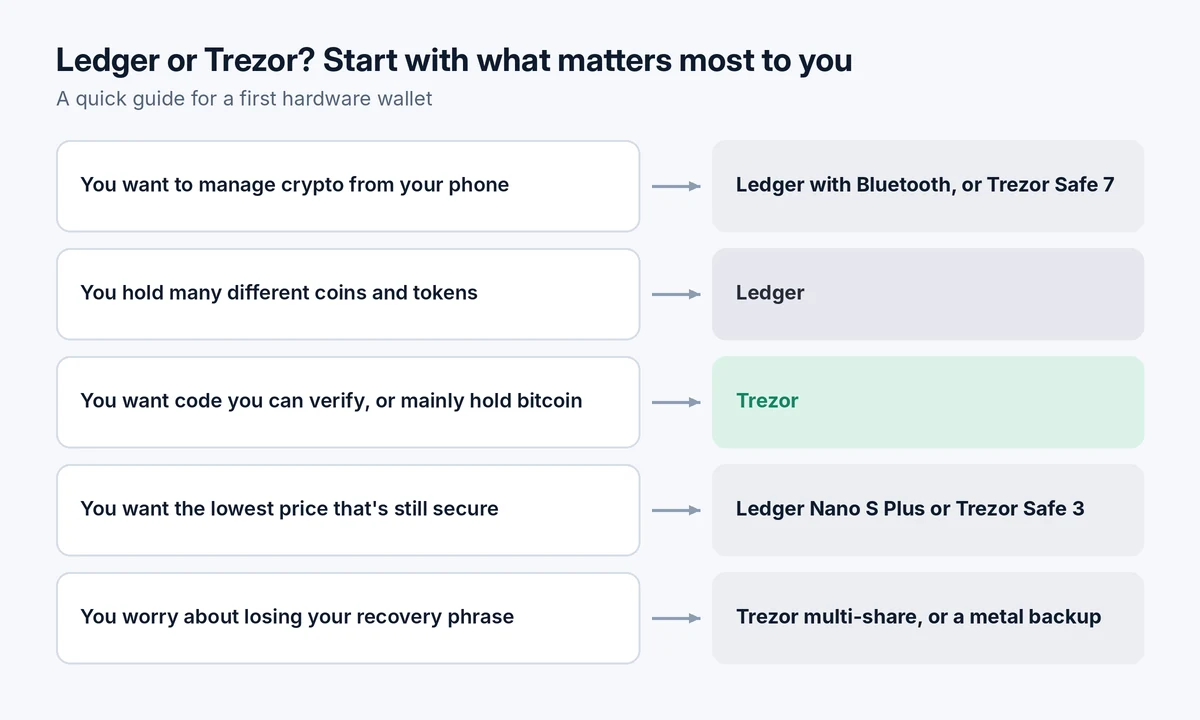
Choose a Ledger if:
- You hold a wide mix of coins and tokens.
- You want to manage everything from your phone with a Bluetooth model.
- You’d like buying, swapping and staking built into the same app.
Choose a Trezor if:
- Open-source, publicly reviewable code matters to you.
- You mostly hold bitcoin and a few major coins.
- You’d like the multi-share backup option built in.
- You want the lowest-cost device with a secure element.
If you can’t decide, you won’t go wrong with either entry model. The difference between a Ledger and a Trezor matters far less than the difference between owning a hardware wallet and not having one. Our pillar guide, crypto wallets explained, covers where hardware wallets fit, and the best crypto wallets for beginners compares them with other options.
Buying and setting up safely
- Buy directly from Ledger or Trezor, or from an authorized reseller listed on their sites. Avoid marketplaces, second-hand devices and “deals” on social media.
- Check the device is new and that it asks you to create a new recovery phrase. If it arrives with a phrase already written down or a “pre-configured” card, don’t use it: it’s a scam.
- Download the app only from the official website by typing the address yourself.
- Write the recovery phrase on paper or metal and never type it into a computer, phone or website.
- Send a small test amount before moving larger sums. How to move crypto from Coinbase to a hardware wallet walks through the full process.
- Read every transaction on the device screen before approving, and check the address matches.
After setup, watch for emails, texts or letters claiming to be from Ledger or Trezor that ask you to “verify” or “upgrade” your device by entering your recovery phrase. They’re always scams. See 10 common crypto scams for other warning signs.
Quick answers
Ledger vs Trezor: which is safer?
Both are considered secure for everyday users with current models. Ledger relies on a certified closed chip; Trezor relies on open code plus a secure chip. Your own handling of the recovery phrase matters far more than the brand.
Can I use a Ledger recovery phrase on a Trezor, or the other way round?
Generally yes, since both use standard recovery phrases for most coins. Trezor’s multi-share backups and passphrase setups need extra care, so check compatibility before relying on it.
What if Ledger or Trezor goes out of business?
Your coins stay on the blockchain. With your recovery phrase, you can restore them in another compatible wallet.
Do I need the most expensive model?
No. The entry models protect your keys just as well. Pay more only if you want a bigger screen, touch controls or Bluetooth.
This article is for educational purposes only and isn’t financial advice. Prices and specifications were taken from the manufacturers’ published information and may change.
Pingback: Is It Safe to Keep Crypto on an Exchange? Risks Explained
Pingback: How to Move Crypto From Coinbase to a Hardware Wallet (Step by Step)
Pingback: How to Store a Seed Phrase Safely (and Mistakes That Get People Robbed)