The best crypto tax software for you depends mainly on where you file and how many transactions you have. For investors outside the US, or anyone filing in more than one country, Koinly stands out for its wide country support, including HMRC’s UK rules, Canada’s adjusted cost base and Australia’s ATO reports. For US filers, CoinLedger and CoinTracker are strong choices, with close integrations with TurboTax. All three let you import your data and preview your results for free, and you only pay when you download the tax report.
Below is how they compare on price, what they do, and how to pick between them.
We haven’t run a paid, side-by-side test of these tools. This comparison is based on their published features and prices, checked in November 2026. Prices change each tax season, so confirm on each site before buying.
What crypto tax software does
You connect your exchanges and wallets, by API or by uploading exports, and the software:
- imports every transaction across all your accounts,
- matches transfers between your own wallets so they aren’t counted as sales,
- calculates gains, losses and income using your country’s rules,
- produces tax reports, such as Form 8949 in the US or a capital gains summary for HMRC.
If you’ve made more than a few dozen trades, or used more than one platform, doing this by hand is slow and error-prone. Our guide on how to report crypto on your tax return shows what the software is doing behind the scenes.
Koinly vs CoinLedger vs CoinTracker at a glance
| Koinly | CoinLedger | CoinTracker | |
|---|---|---|---|
| Best for | Non-US investors and multi-country filers | US filers who use TurboTax or another tax app | US filers who also want portfolio tracking |
| Pricing model | Per tax year | Per tax year | Per tax year |
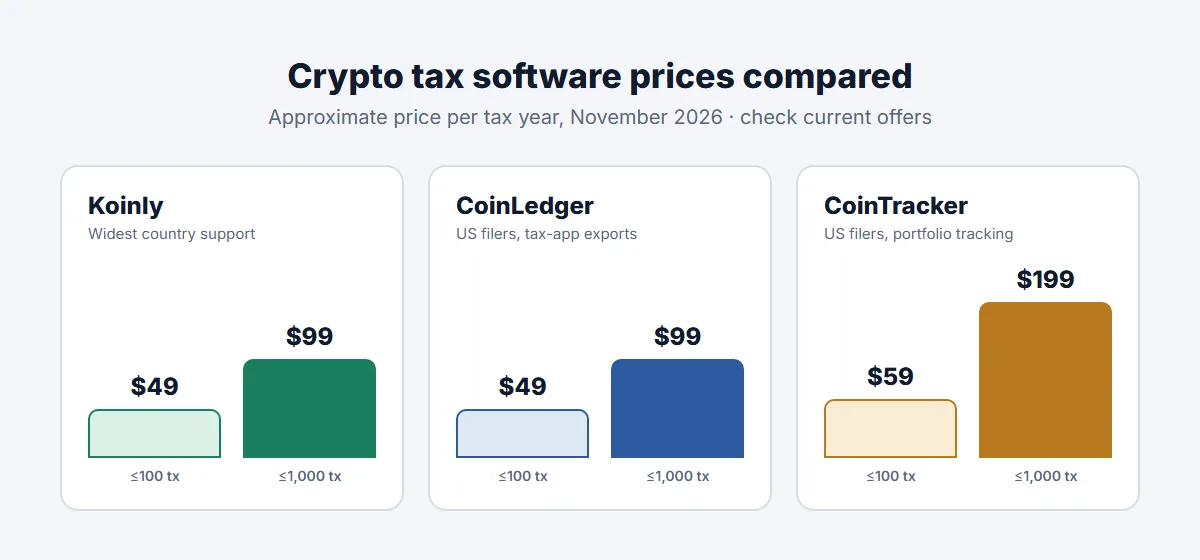
| Entry plan | About $49 for up to 100 transactions | About $49 for up to 100 transactions | About $59 for up to 100 transactions |
| Around 1,000 transactions | About $99 | About $99 | About $199 |
| Free option | Import, track and preview; pay to download reports | Import and preview; pay to download reports | Portfolio tracking; pay for tax forms |
| Country rules | Widest coverage, including UK, Canada and Australia | Focused on the US | Focused on the US |
| US tax forms | Form 8949 and tax-software exports | Form 8949 and exports to TurboTax and others | Form 8949 and TurboTax integration |
Prices are approximate entry-tier figures for the 2026 tax season from the public pricing pages of Koinly, CoinLedger and CoinTracker, and recent reviews. Higher tiers for thousands of transactions vary more, and all three sometimes run discounts.
Koinly
Koinly is the most international of the three. It supports country-specific calculations, such as HMRC’s same-day and 30-day matching rules with the section 104 pool, Canada’s average-cost method and the Australian 12-month discount, and it produces reports formatted for those tax systems. It imports from a very large list of exchanges, wallets and blockchains.
Good for: UK, Canadian and Australian investors; people who’ve lived in more than one country; anyone with activity across many chains.
Watch out for: the transaction limits that decide your plan include every trade, transfer and reward, so DeFi users and active traders can quickly move into higher tiers.
CoinLedger
CoinLedger is built around US filers. It produces a completed Form 8949 and exports directly to popular US tax filing software, including TurboTax. Its interface is simple, with a clear review step for transactions it couldn’t classify automatically.
Good for: US investors with a moderate number of transactions who file with TurboTax or similar software.
Watch out for: if you file outside the US, check that it supports your country’s specific rules before paying.
CoinTracker
CoinTracker combines tax reports with ongoing portfolio tracking, and has partnerships with Coinbase and TurboTax that can bring discounts for those users. Paid plans let you choose a cost basis method such as FIFO or HIFO, and higher tiers include tax-loss harvesting tools.
Good for: US investors who want one app for tracking their portfolio during the year and producing tax forms at the end.
Watch out for: at around 1,000 transactions it’s usually pricier than the other two, so compare the tier you’d actually need. And don’t confuse it with CoinTracking, a separate company with a similar name.
How to choose the best crypto tax software for you
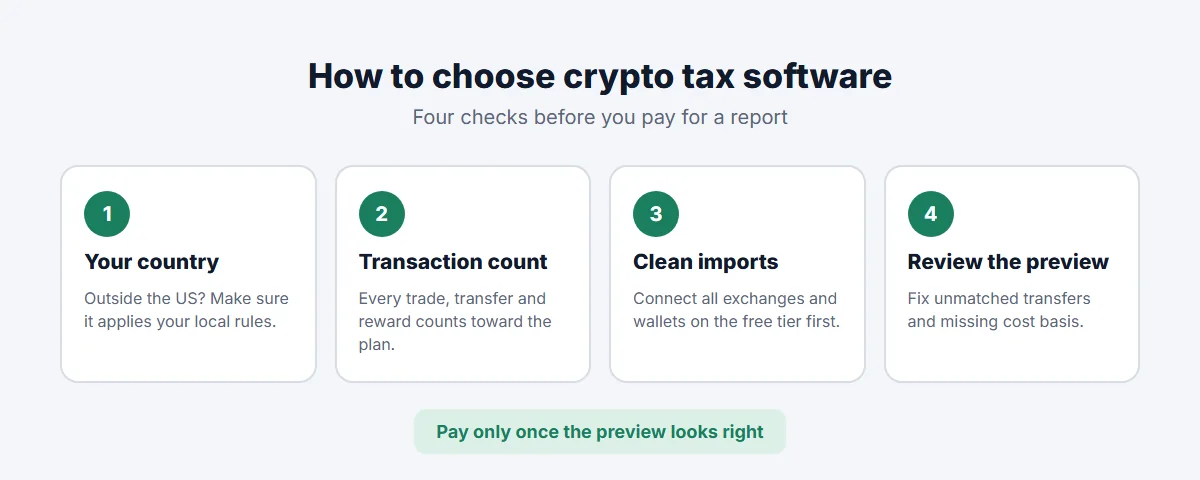
- Start with your country. If you file in the UK, Canada or Australia, make sure the tool applies your country’s rules, not just US ones. This is where Koinly tends to stand out.
- Count your transactions. Include every buy, sell, swap, transfer and staking reward for the tax year. That number decides your plan.
- Check your platforms import cleanly. Connect your exchanges and wallets on the free tier. Missing or messy imports are the most common cause of wrong results.
- Review the preview. Look for unmatched transfers or missing cost basis before you pay. All three flag problems for you to fix.
- Pay for the tax year you’re filing, and download the reports you need.
Whatever tool you use, the output is only as good as the data. If an exchange you used years ago has closed and you have no export, you may need to reconstruct those transactions from emails or bank statements.
Do you need an accountant instead?
Software is usually enough if you mostly buy, hold, sell and stake through well-known exchanges. Consider a crypto-savvy accountant, ideally alongside the software, if:
- you have heavy DeFi activity, liquidity pools or NFTs,
- you trade frequently enough that it might count as a business,
- you’ve missed crypto on past returns and need to correct them,
- you’ve moved country or hold crypto through a company.
Many accountants work from a Koinly, CoinLedger or CoinTracker report, so choosing software first still saves time and fees. For the basics of what’s taxable, see crypto taxes explained, or the country guides for the US, UK, Canada and Australia.